Introduction
What is QKD Simulation Platform?
The QKD Simulation Platform is an open-source software framework designed for simulating and analyzing Quantum Key Distribution (QKD) protocols in realistic network environments. It provides researchers, engineers, and students with a comprehensive tool for studying quantum communication systems, protocol performance, and network security.
Quantum Key Distribution (QKD) is a revolutionary technology that enables two parties to generate a shared secret key using the principles of quantum mechanics. Unlike classical cryptographic methods, QKD provides information-theoretic security based on the fundamental laws of physics rather than computational complexity.
Project Goals
Research and Education: Provide a platform for studying QKD protocols and their performance characteristics
Protocol Comparison: Enable fair comparison between different QKD protocols under identical conditions
Network Analysis: Study QKD performance in multi-node network topologies
Parameter Optimization: Help optimize system parameters for maximum key generation rates
Security Analysis: Analyze the impact of various noise sources and attacks on QKD performance
Open Source: Foster collaboration and innovation in the quantum communication community
Architecture Overview
The platform follows a modular, layered architecture designed for extensibility and maintainability:
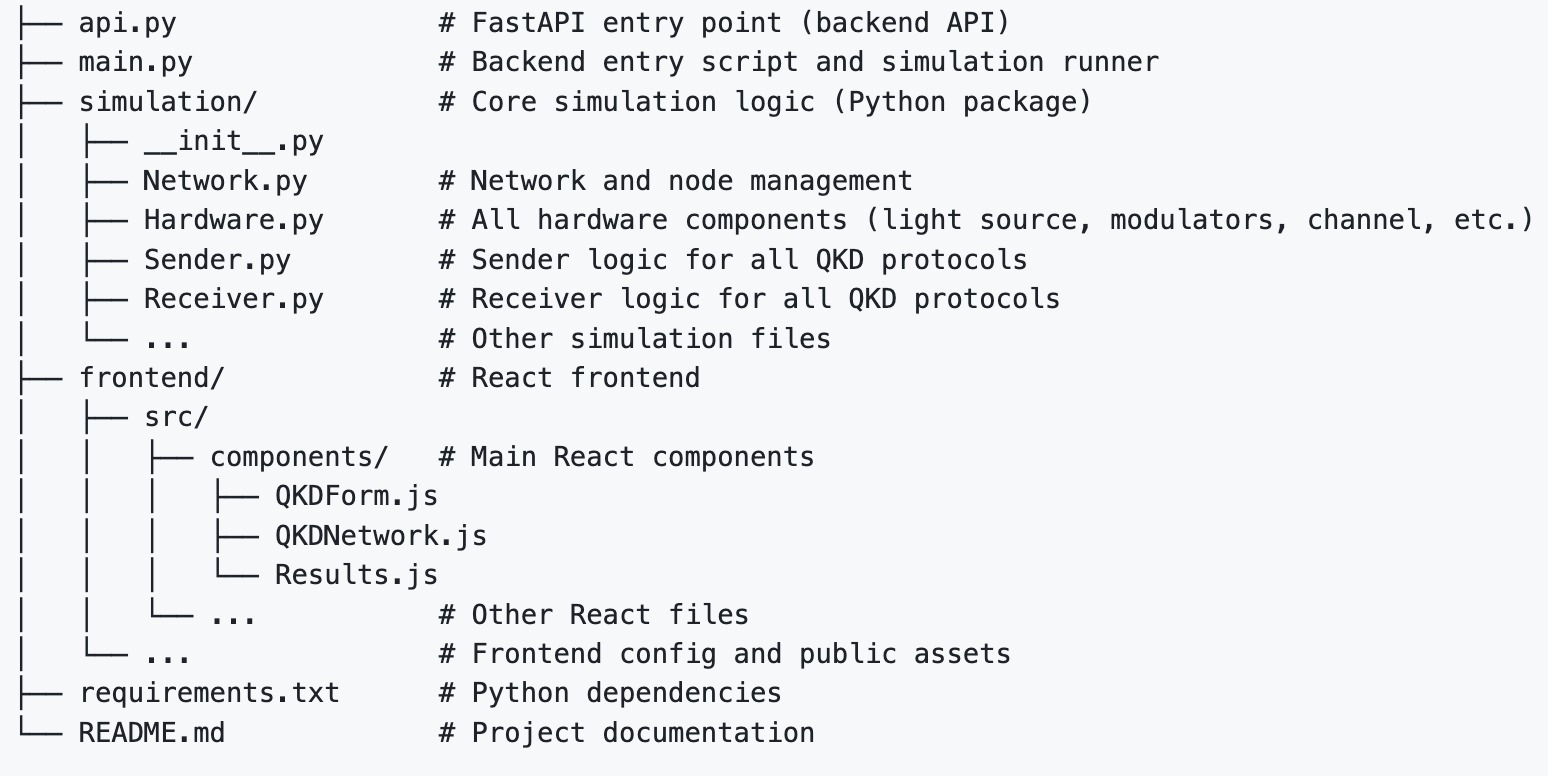
High-level architecture of the QKD Simulation Platform
Core Components
Backend Simulation Engine
The backend is built in Python and provides the core simulation functionality:
Protocol Implementations: Theory-compliant implementations of DPS-QKD, COW-QKD, and BB84-QKD
Hardware Models: Realistic models of optical components (detectors, modulators, channels)
Network Management: Multi-node network simulation with trusted relay support
Analysis Tools: QBER calculation, key rate analysis, and post-processing simulation
Key Classes:
simulation.Network.Network- Main network management classsimulation.Network.Node- Individual network node with protocol supportsimulation.Hardware.*- Hardware component modelssimulation.Sender.*- Protocol-specific sender implementationssimulation.Receiver.*- Protocol-specific receiver implementations
Web Frontend
The frontend is built with React and provides an intuitive user interface:
Network Topology Builder: Visual drag-and-drop interface for creating network configurations
Parameter Configuration: Interactive forms for setting protocol and hardware parameters
Results Visualization: Real-time display of simulation results and performance metrics
Protocol Selection: Easy switching between different QKD protocols
Key Components:
QKDForm- Protocol selection and parameter configurationQKDNetwork- Interactive network topology builderResults- Simulation results display and analysis
REST API
The FastAPI-based REST API provides programmatic access to the simulation engine:
Simulation Endpoints: Run simulations with custom parameters
Protocol Support: Dedicated endpoints for each QKD protocol
Multi-node Support: Handle complex network topologies
Results Format: Structured JSON responses with comprehensive metrics
Key Endpoints:
POST /simulate- Main simulation endpointGET /- API information and status
Supported QKD Protocols
DPS-QKD (Differential Phase Shift)
DPS-QKD encodes information in the phase difference between consecutive optical pulses. The protocol uses:
Encoding: Phase difference between consecutive pulses (0, π)
Detection: Mach-Zehnder interferometer with two detectors
Sifting: Based on detector clicks and phase difference
Key Rate: ~25% of raw bits after sifting
Hardware: Fiber Mach-Zehnder interferometer with delay line
COW-QKD (Coherent One-Way)
COW-QKD uses intensity modulation to encode information and includes monitoring pulses for eavesdropping detection:
Encoding: Intensity modulation (vacuum + coherent pulse)
Detection: Single photon detector with intensity monitoring
Sifting: Keep bits where Alice and Bob agree on data pulses
Monitoring: Pairs of monitoring pulses for eavesdropping detection
Key Rate: ~40% of raw bits after sifting
Hardware: Single photon detector with optical switching
BB84-QKD (Bennett-Brassard 1984)
BB84 is the original QKD protocol that uses four quantum states in two conjugate bases:
Encoding: Four quantum states in two bases (rectilinear and diagonal)
Detection: Single photon detector with basis switching
Sifting: Keep bits where Alice and Bob used the same basis
Security: Based on quantum uncertainty principle
Key Rate: ~50% of raw bits after sifting
Hardware: Polarizing beam splitter with basis switching
Hardware Models
The platform includes realistic models of optical components commonly used in QKD systems:
Optical Components
Light Source: Weak coherent pulse (WCP) source with Poissonian photon statistics
Phase Modulator: Phase modulation with configurable phase shifts
Intensity Modulator: Amplitude modulation with finite extinction ratio
Optical Channel: Fiber channel with distance-dependent attenuation
Mach-Zehnder Interferometer: Interference-based phase difference measurement
Single Photon Detector: Detector with quantum efficiency and dark count modeling
Fiber Types
Standard Single Mode Fiber (SMF-28): Standard telecom fiber
Dispersion Shifted Fiber: Optimized for specific wavelength ranges
Non-Zero Dispersion Shifted Fiber: Enhanced performance for DWDM systems
Photonic Crystal Fiber: Advanced fiber with unique optical properties
Network Architecture
The platform supports various network topologies:
Point-to-Point
Simple two-node configuration for basic QKD analysis:
# Create a simple point-to-point network
network = Network()
alice = network.add_node('Alice')
bob = network.add_node('Bob')
network.connect_nodes('Alice', 'Bob', distance_km=20)
Multi-Node Networks
Complex networks with multiple nodes and channels:
# Create a multi-node network
network = Network()
nodes = ['Alice', 'Relay1', 'Relay2', 'Bob']
for node_id in nodes:
    network.add_node(node_id)

# Connect nodes in a chain
for i in range(len(nodes) - 1):
    network.connect_nodes(nodes[i], nodes[i+1], distance_km=10)
Trusted Relay Networks
Networks using trusted relay nodes for extended reach:
# Establish end-to-end key through trusted relays
final_key = network.establish_end_to_end_raw_key(
    'Alice', 'Bob', ['Alice', 'Relay1', 'Relay2', 'Bob'],
    num_pulses=10000, pulse_repetition_rate_ns=1
)
Performance Metrics
The platform provides comprehensive performance analysis:
Key Metrics
QBER (Quantum Bit Error Rate): Measure of quantum channel quality
Sifted Key Length: Number of bits after sifting process
Final Key Length: Number of bits after post-processing
Secure Key Rate: Final key generation rate in bits per second
Theory Compliance: Verification against theoretical performance bounds
Post-Processing
Parameter Estimation: QBER estimation using disclosed key fraction
Error Correction: Forward error correction to remove bit errors
Privacy Amplification: Key compression to ensure security
Use Cases
Research Applications
Protocol Comparison: Compare performance of different QKD protocols
Parameter Optimization: Find optimal system parameters for maximum key rates
Noise Analysis: Study the impact of various noise sources on performance
Security Analysis: Analyze vulnerability to different attack strategies
Educational Applications
QKD Learning: Understand QKD principles through hands-on simulation
Protocol Implementation: Study how QKD protocols are implemented in practice
Network Design: Learn about QKD network design and optimization
Industrial Applications
System Design: Design and optimize QKD systems for deployment
Performance Prediction: Predict system performance under various conditions
Troubleshooting: Diagnose performance issues in QKD systems
Getting Started
To get started with the QKD Simulation Platform:
Installation: Follow the Installation Guide guide to set up the platform
Quick Start: Run your first simulation with the Quick Start Guide tutorial
User Guide: Learn about all features in the User Guide
Examples: Explore the examples for practical use cases
For developers interested in extending the platform:
API Reference: Complete API documentation in API Reference
Simulation Models: Detailed model descriptions in Simulation Models
Contributing: Guidelines for contributing to the project in Contributing to QKD Simulation Platform